AI
Automation
Productivity
Claude Code
macOS
Automated Daily Standup with Claude Code and launchd
If you write standups manually every day, you are probably spending 10–20 minutes on repetitive context switching.
This setup automates the full loop:
- trigger at a fixed time
- gather updates from GitHub + Linear
- generate a clean summary
- publish to Notion
- keep logs for traceability
System architecture
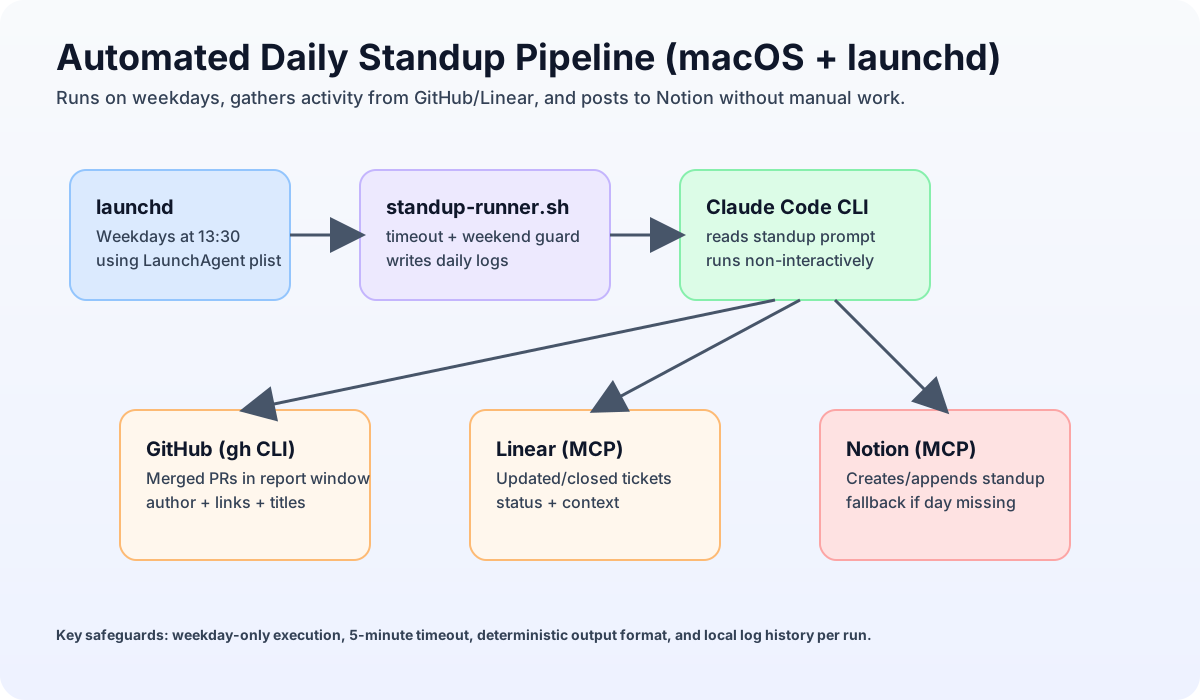
At a high level:
launchdstarts a script every weekday at 13:30.- The script calls Claude Code in non-interactive mode.
- Claude reads a strict prompt and collects updates from tools.
- Claude writes the standup to Notion and exits.
- The script stores logs for debugging and auditability.
Why this is reliable in practice
- deterministic schedule (
launchd) - weekend skip logic in the script
- timeout watchdog to avoid hung runs
- timezone-aware reporting window
- local run logs for fast troubleshooting
A key detail: for PRs, use merged_at in your prompt logic, not created_at. Otherwise, old PRs merged today can be missed.
Reporting window design (the part most people get wrong)
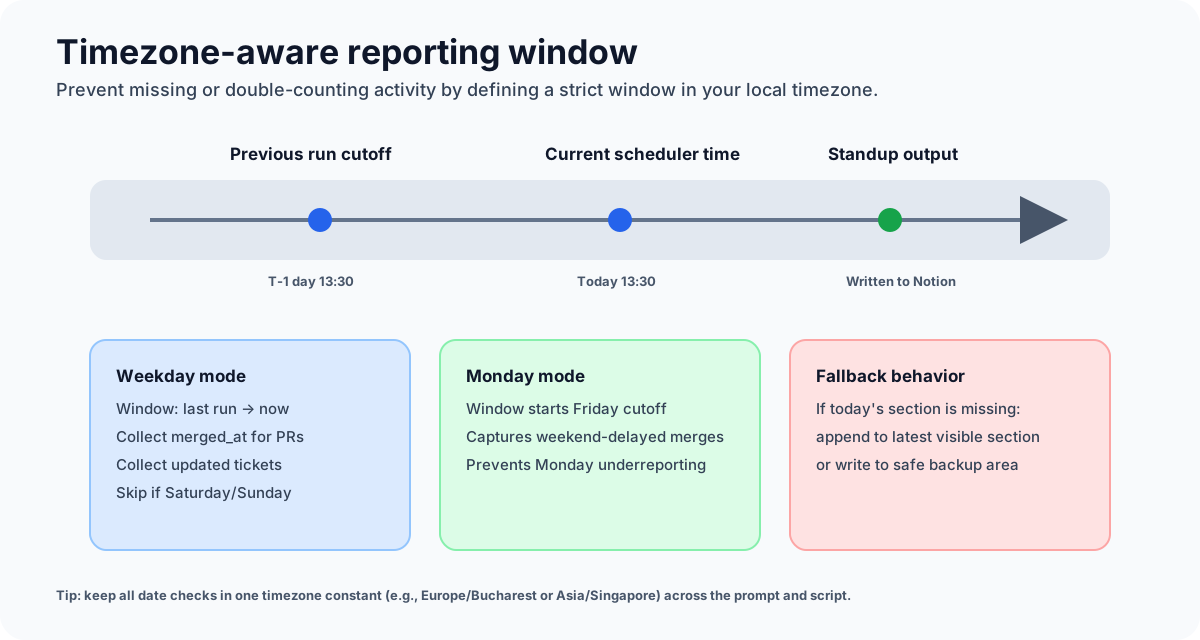
Standup quality depends on the time window. The safest approach is:
- report from previous cutoff to current run time
- on Monday, include Friday→Monday gap
- keep one explicit timezone constant in both script and prompt
This avoids duplicates and missing updates around day boundaries.
Prerequisites
- macOS (this guide uses
launchd) - Claude Code CLI installed
- GitHub CLI (
gh) installed and authenticated - MCP integrations configured for Linear + Notion
- a Notion destination page for daily standups
Non-interactive runs cannot answer permission prompts. If your setup requires --dangerously-skip-permissions, keep your prompt scoped to trusted tools only.
Step 1: prompt file
Create ~/.claude/standup-prompt.txt.
Keep the prompt strict and structured:
- define exact reporting window rules
- require grouped output sections (PRs, tickets, blockers, next)
- define fallback behavior when today's Notion section does not exist
- forbid any actions outside standup generation
Example prompt skeleton:
You are generating a daily standup update.Timezone: Europe/BucharestCurrent run time: provided by system clock.Reporting window:- Standard days: previous run cutoff -> current run time.- Monday: previous Friday cutoff -> current run time.Data sources:1) GitHub via gh CLI (author = me, use merged_at for PRs)2) Linear via MCP (my tickets updated/closed in window)3) Notion via MCP (append under today's section)Output format (strict):## Yesterday- ...## Today- ...## Blockers- ... or "None"Fallback behavior:- If today's section is missing, append to latest visible daily section and include a NOTE line.Safety constraints:- Do not create unrelated pages.- Do not modify historical entries outside the current target section.
Step 2: runner script
Create ~/.claude/standup-runner.sh and make it executable.
#!/usr/bin/env bashset -euo pipefailBASE_DIR="$HOME/.claude"PROMPT_FILE="$BASE_DIR/standup-prompt.txt"LOG_DIR="$BASE_DIR/standup-logs"mkdir -p "$LOG_DIR"DAY="$(date +%F)"LOG_FILE="$LOG_DIR/$DAY.log"FORCE=falseSHOW_LOGS=falseCRON_MODE=falsefor arg in "$@"; docase "$arg" in--force) FORCE=true ;;--logs) SHOW_LOGS=true ;;--cron) CRON_MODE=true ;;esacdoneif [ "$SHOW_LOGS" = true ]; thentail -n 200 "$LOG_FILE" 2>/dev/null || echo "No log yet for $DAY"exit 0fi# Skip weekends unless manually forcedDOW="$(date +%u)" # 1..7 (Mon..Sun)if [ "$FORCE" = false ] && { [ "$DOW" -eq 6 ] || [ "$DOW" -eq 7 ]; }; thenecho "[$(date)] Weekend detected, skipping." >> "$LOG_FILE"exit 0fiCMD=(claude--dangerously-skip-permissions-p "$(cat "$PROMPT_FILE")")# 5-minute watchdogif command -v gtimeout >/dev/null 2>&1; thenTIMEOUT_BIN="gtimeout"elseTIMEOUT_BIN="timeout"fi{echo "===== $(date) =====""$TIMEOUT_BIN" 300 "${CMD[@]}"echo ""} >> "$LOG_FILE" 2>&1if [ "$CRON_MODE" = false ]; thenecho "Standup run complete. Log: $LOG_FILE"fi
chmod +x ~/.claude/standup-runner.sh
Step 3: launchd job
Create ~/Library/LaunchAgents/com.claude.standup.plist:
<?xml version="1.0" encoding="UTF-8"?><!DOCTYPE plist PUBLIC "-//Apple//DTD PLIST 1.0//EN" "http://www.apple.com/DTDs/PropertyList-1.0.dtd"><plist version="1.0"><dict><key>Label</key><string>com.claude.standup</string><key>ProgramArguments</key><array><string>/bin/bash</string><string>-lc</string><string>~/.claude/standup-runner.sh --cron</string></array><key>StartCalendarInterval</key><dict><key>Hour</key><integer>13</integer><key>Minute</key><integer>30</integer></dict><key>RunAtLoad</key><false/><key>StandardOutPath</key><string>~/.claude/standup-logs/launchd-stdout.log</string><key>StandardErrorPath</key><string>~/.claude/standup-logs/launchd-stderr.log</string></dict></plist>
Load and verify:
launchctl unload ~/Library/LaunchAgents/com.claude.standup.plist 2>/dev/null || truelaunchctl load ~/Library/LaunchAgents/com.claude.standup.plistlaunchctl list | grep claude.standup
Operational commands
# Manual test~/.claude/standup-runner.sh# View today's run log~/.claude/standup-runner.sh --logs# Restart after plist editslaunchctl unload ~/Library/LaunchAgents/com.claude.standup.plistlaunchctl load ~/Library/LaunchAgents/com.claude.standup.plist
Troubleshooting
-
Nothing runs
- verify agent is loaded with
launchctl list | grep claude.standup - check launchd stderr log for path/env issues
- verify agent is loaded with
-
Notion update fails
- re-auth MCP integrations interactively and re-run manually
- validate fallback logic for missing daily section
-
Laptop sleeping during run
- this setup requires machine awake + internet at runtime
- if reliability is critical, move the same script to an always-on server
-
Wrong standup content window
- ensure timezone is explicitly set in both prompt and script assumptions
- check Monday override logic
Do not allow broad autonomous actions in this workflow. Keep scope narrow: read activity, write one standup destination, exit.
Final thoughts
This automation works best when you treat it like a small production system:
- clear inputs
- deterministic schedule
- explicit safety boundaries
- observability via logs
If you do that, your standup becomes reliable infrastructure instead of daily manual overhead.